 Crafter & Baker Pricing Calculator
What should I charge at a craft fair?
Enter your materials, how long one takes and the hourly pay you want. See a fair booth price, a wholesale check and what you really earn at today's price.
- Free
- No signup
- Updates as you type
- Nothing you type is saved
Covers your costs, $15/hr for your time and a 30% margin, rounded up to a booth-friendly price.
Want this saved for every product you make? See Maker Pricing Pro (waitlist, nothing to pay).
Show the math
| Materials | $3 |
| Packaging | $0 |
| Your time: 90 min × $15/hr | $22.50 |
| Booth share | $0 |
| Other overhead | $0 |
| Full cost of one item | $25.50 |
| Selling fees | none (cash) |
| Charge at least = (full cost + fixed fee) ÷ (1 − fee %), rounded up to a dollar | $25.50 → $26 |
| Booth price = (full cost + fixed fee) ÷ (1 − 30% margin − fee %), rounded up | $36.43 → $40 |
Pricing one item is easy. Pricing your whole booth?
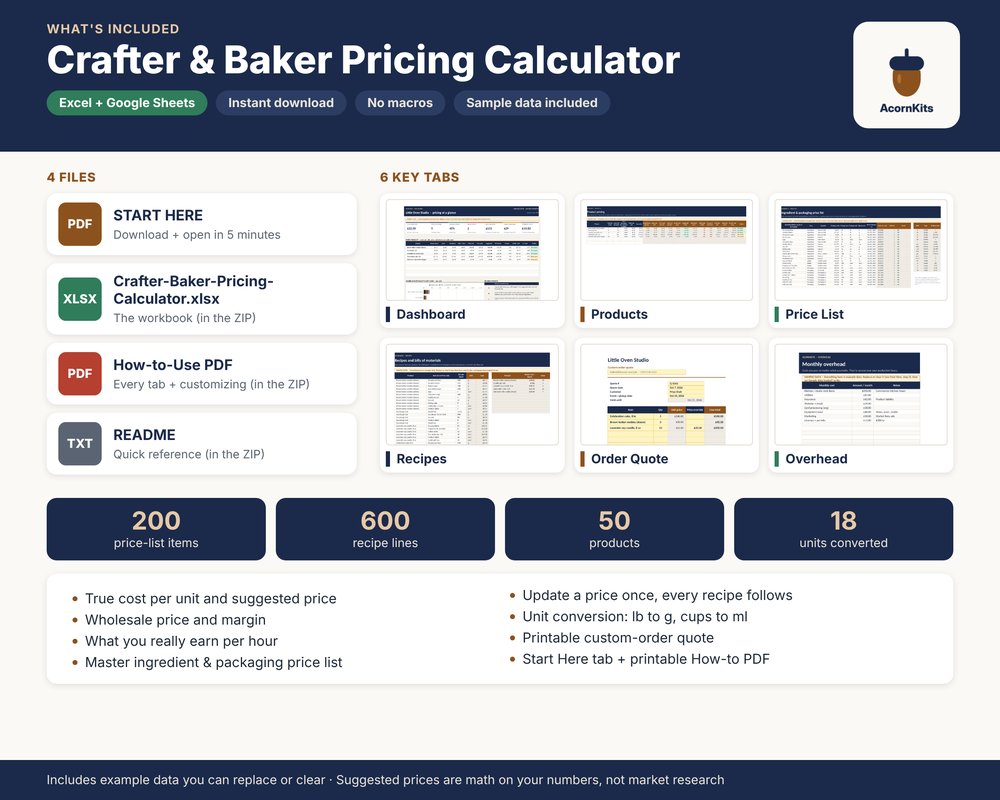
The Crafter & Baker Pricing Calculator is a spreadsheet that does this math for up to 50 products at once:
- One supply price list: change a price once and every product updates
- Cost per item, suggested retail and wholesale, and what you earn per hour
- Overhead spread over your hours, plus printable custom-order quotes
- Excel + Google Sheets. One-time $15. No subscription, no account
Want your prices to keep themselves up to date?
We're thinking about building Maker Pricing Pro, a web app version of this checker for makers who sell all year. It isn't built yet. We'll build it if enough makers want it, and this waitlist is how we'll know.
- Saved materials and recipes. Enter each supply once with what you paid, then build every product from them.
- Automatic re-costing. When a supply price changes, update it once and every product that uses it is re-costed.
- Etsy fee-aware pricing. Prices that account for Etsy's listing, transaction and payment processing fees, so the fees don't come out of your pay.
- Etsy order CSV import. Upload the orders file you can download from Etsy and see your sales next to what they cost you to make.
- Year-end cost-of-goods summary. One yearly summary of what your materials and supplies cost, ready to hand to whoever does your taxes.
Founding price: $9/month or $79/year. Join the waitlist and that price is locked in for you when it launches. No payment now. We'll email you when it's ready. More about Maker Pricing Pro
Join the waitlist
Free. No card, nothing to pay now.
How to price for a craft fair in 4 steps
This is the same math the checker runs. Do it once per item and you'll know your floor before fair day.
- Count every costMaterials and packaging for one item, plus a share of the booth fee and other overhead.
- Pay yourselfMinutes to make it ÷ 60 × the hourly rate you want. This is the step most people skip.
- Add a marginProfit for the business, so slow days and unsold stock don't come out of your wage.
- Check wholesaleIf shops pay half of retail, make sure that half still covers your cost to make.
Questions
How do I price handmade items for a craft fair?
Add up what one item really costs you: materials and packaging, your time (minutes to make it ÷ 60 × the hourly pay you want), your share of the booth fee (the fee ÷ how many items you expect to sell) and any other overhead per item. That total is the least you can charge without working for less than your rate. Then add a profit margin on top, because some items won't sell, some days are slow, and the business needs money to grow. The checker does exactly this and rounds the result up to a booth-friendly price.
What hourly rate should I pay myself?
That's your call, and it's the number that matters most. The checker starts at $15 an hour as an example. Some makers start at their local minimum wage, others at what they'd earn at a day job. Try a few rates and watch how the price changes. If the price feels too high for your market, the honest fixes are making the item faster, lowering material costs or choosing a different item, not working for $3 an hour.
Why add a profit margin on top of my wage?
Your wage pays you for the time spent making things. The margin pays the business: unsold stock, mistakes, slow fairs, a new tent, the next booth fee. The default is 30% of the price (so $3 of every $10 sale). You can change it under More costs.
How do I include the booth fee?
Divide the booth fee by the number of items you realistically expect to sell at that fair, not the number you're bringing. A $60 booth fee and 30 sales puts $2 on every item. If you're not sure, use what you sold at a similar fair.
What about card reader and Etsy fees?
Open More costs and pick Cash, Card reader or Etsy. Card reader starts at 2.6% + $0.15 per sale, Square's US in-person rate on its free plan as of October 2026. Etsy uses the US seller fees as of October 2026: $0.20 listing + 6.5% transaction + 3% + $0.25 payment processing, so 9.5% + $0.45 per sale (shipping and Offsite Ads aren't included). Fees change, so type your own rate if it's different.
Why is wholesale 50% of retail, and what does the red flag mean?
Shops usually buy at about half of the retail price so they can mark it back up. The checker compares that wholesale price with your cost to make one item (materials, packaging, overhead and your time, without booth fees or selling fees). If wholesale doesn't cover it, a shop order would pay you less than your hourly rate, and it shows the lowest retail price that makes wholesale work. Change the percentage under More costs if your shops pay a different share.
Why does it round prices up?
Round prices are easier at a booth: faster change, simpler signs, fewer coins. It rounds up to the next whole dollar under $20, to the next $5 from $20 to $200, and to the next $10 above that. It never rounds down, so rounding can only add to what you earn.
Is this a market price?
No. It's math on your own numbers, not market research. Use it to know your floor, then look at what similar items sell for at your fairs. If the market price is below your floor, that's useful to know before you make 40 of them.
Do you store what I type?
No. The math runs in your browser, and nothing you type is sent anywhere. The page counts a few anonymous actions as daily totals (for example "price card saved" or "copy link"), with no cookies, no IP address and no visitor ID. The price card is drawn on your device, and a copied link carries your numbers in the link itself, so only people you share it with see them. The one exception is the optional Maker Pricing Pro waitlist form further down the page: if you fill it in and press Join, we store the email and answers you give there, as the privacy policy explains.
The Craft Fair Price Checker is a free planning tool from Acorn Kits. Prices are math on the numbers you enter, not market research, and nothing here is tax, legal or business advice. Fee presets were checked in October 2026 and can change.